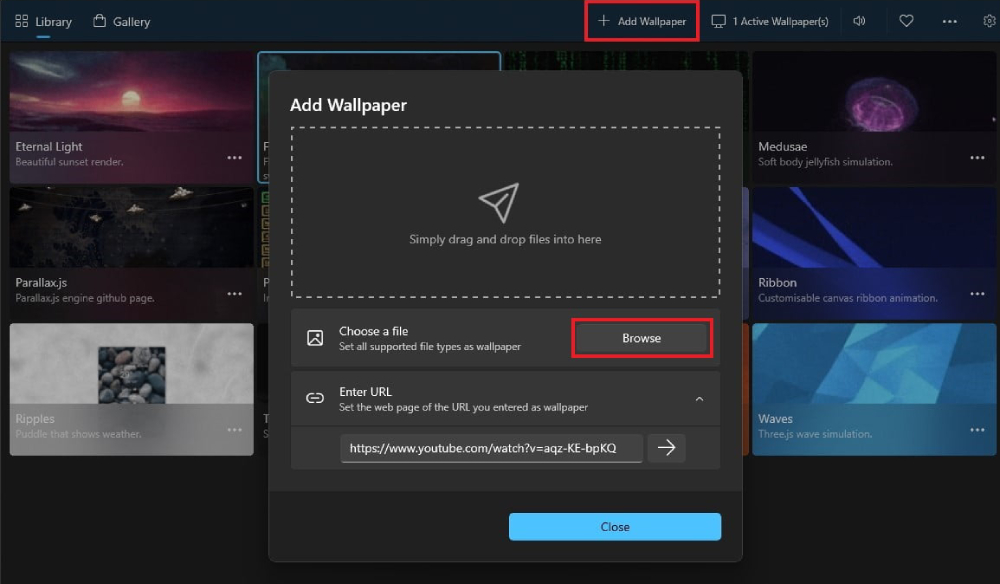
The safest, most capable tool for Windows 10 and Windows 11 is Lively Wallpaper. Developed by Dani John, this completely free live wallpaper software is open-source and officially distributed through the Microsoft Store. It operates cleanly inside the Windows sandbox, meaning it does not alter core system files or install bundled bloatware.
Setting up your animated background takes under three minutes:
- Download the Software: Open the Microsoft Store app on your PC, search for Lively Wallpaper, and select Install. Alternatively, grab the direct installer from GitHub.
- Launch and Explore: Open Lively from your Start menu. The app launches with a default library of preloaded interactive environments and kinetic simulations.
- Import Your GIF: Click the Add Wallpaper icon (the
+symbol) in the upper navigation bar. - Select Your File: Drag and drop your downloaded `.gif` file directly into the app window, or click Browse to select it from your local storage drive.
- Configure Metadata: An attribute dialogue box will appear. Enter a title for your wallpaper and click OK. Lively will automatically compile the GIF and project it beneath your desktop shortcuts.
If you prefer an alternate animation, open the Lively library, right-click the item, and select Set as Wallpaper. To restore your standard wallpaper, close or pause the application from the Windows taskbar system tray.

